Minecraft Redstone Basics: Power, Signals and Your First Circuits
How redstone power works in Minecraft: dust, signal strength, power sources, repeaters, comparators, pistons and observers, plus two first builds explained.
Redstone is Minecraft’s electricity. With it, players build automatic doors, hidden entrances, farms that harvest themselves, item sorters and, at the extreme end, working calculators. It can look intimidating, but the basics come down to a handful of ideas: something produces a signal, something carries it and something reacts to it. Once those click, most redstone builds are combinations of a few simple parts.
This guide explains how power and signals work, introduces the key components and walks through two beginner builds in words. Redstone behaves slightly differently in Java Edition and Bedrock Edition, and we flag the main differences along the way; for the bigger picture of how the two editions differ, see our Java vs Bedrock comparison. All mechanics described here are checked against the Minecraft Wiki.
The Three Parts of Every Circuit
Every redstone build, from a lamp switch to a giant farm, has three kinds of parts:
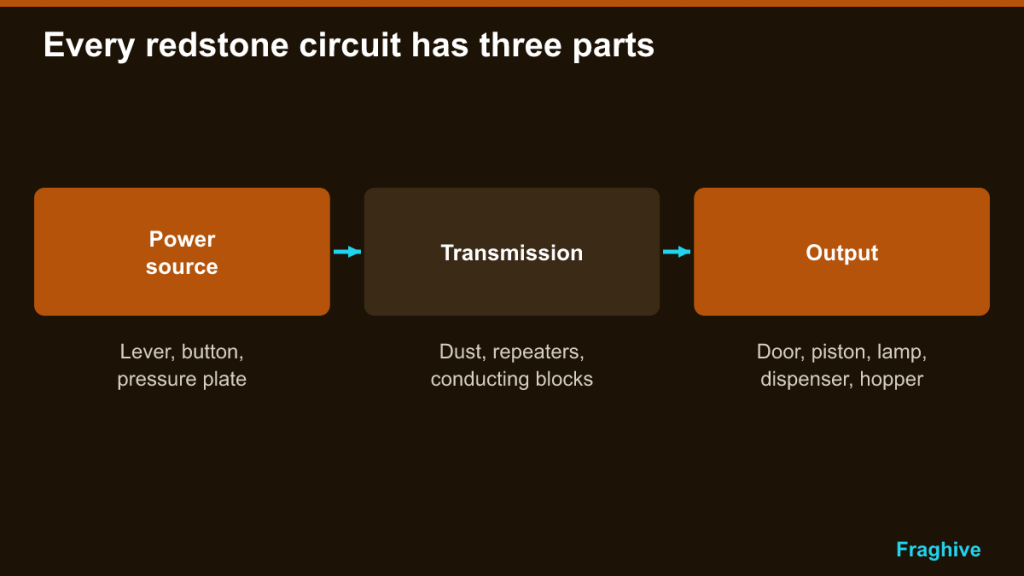
- Power sources create a signal: a lever, a button, a pressure plate and so on.
- Transmission carries the signal: redstone dust (also called wire), repeaters and blocks that conduct power.
- Outputs do something when powered: doors, pistons, lamps, dispensers, droppers, hoppers, note blocks and more.
Thinking in these three steps makes it much easier to read other people’s builds and design your own. Ask: what turns this on, how does the signal get there and what happens at the end?
Redstone Dust and Signal Strength
Redstone dust is the basic wire. You get it mainly by mining redstone ore with an iron pickaxe or better, which the Minecraft Wiki notes yields 4 to 5 dust per ore before Fortune. It also drops from witches and can be found in chests in structures such as mineshafts and strongholds. Placed on the ground, dust forms a line of wire that automatically connects to neighboring dust and components.
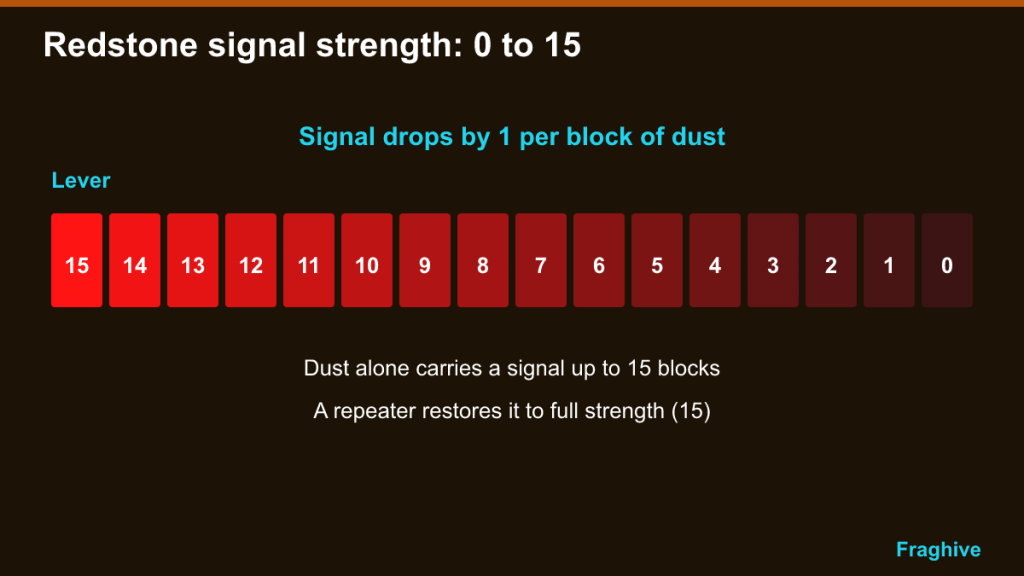
Signal strength: 0 to 15
Redstone signals have a strength from 0 (off) to 15 (full power). A standard power source such as a lever produces strength 15. Every block of dust the signal travels through reduces it by 1, so a signal carried by dust alone can travel up to 15 blocks before it dies out. Brightness of the dust reflects strength: bright red near the source, darker further away.
For longer runs, you need a repeater, which restores the signal to full strength.
Powering blocks
Dust can power the block it sits on and the block it points into. A powered solid block can then activate components next to it, such as a lamp or a piston. This is how signals travel through walls and floors, and it is why you sometimes see a lamp turn on even though no dust touches it directly.
Power Sources
The Minecraft Wiki lists a long range of components that emit power. The ones you will use most as a beginner are:
| Source | Behavior | Typical use |
|---|---|---|
| Lever | Stays on or off until flipped | Switches, toggling lights |
| Button (wood or stone) | Short pulse, then turns off | Doors, one-shot actions |
| Pressure plate | On while something stands on it | Automatic doors, traps |
| Redstone torch | Always on unless the block it is attached to is powered | Inverting signals, constant power |
| Block of Redstone | Permanent power source that can be moved by pistons | Compact constant power |
| Daylight detector | Output depends on sunlight | Lights that turn on at night |
| Observer | Short pulse when the block in front changes | Farms, detectors |
| Tripwire hook | On while the string is crossed | Traps, alarms |
Others include the target block, lightning rod, trapped chest, detector rail and sculk sensors. They follow the same rules: create a signal, let the circuit carry it.
Repeaters: Distance, Delay and Direction
The redstone repeater is crafted from three stone, two redstone torches and one redstone dust. It does three jobs:
- Boost: it restores a signal to full strength 15, so you can extend wires beyond 15 blocks.
- Delay: right-clicking cycles through four delay settings, from 0.1 seconds (the default) to 0.4 seconds. Chaining repeaters creates longer delays.
- Direction: a repeater only passes signals from back to front. This one-way behavior, called a diode, stops signals from leaking back into other parts of the circuit.
Repeaters can also be locked: if another powered repeater or comparator points into a repeater’s side, it freezes in its current state until the lock is released. That is a building block for simple memory circuits.
Edition note: the Minecraft Wiki notes some differences, for example that Bedrock repeaters can be waterlogged and placed on fences and walls, while some very short pulse behaviors only work in Java.
Comparators: Comparing, Subtracting and Measuring
The redstone comparator is crafted from redstone torches, nether quartz and stone, which means you need to visit the Nether first. It has two modes, toggled by using it:
- Comparison mode (front torch off): the output equals the input from the back, unless a side input is stronger, in which case the output turns off.
- Subtraction mode (front torch lit): the output is the back input minus the strongest side input. A back signal of 9 with side signals of 2 and 5 gives 4.
The comparator’s most useful trick for beginners is measuring containers. Placed facing out of a chest, hopper, furnace, barrel or similar block, it outputs a signal from 0 to 15 based on how full the container is. An empty container gives no signal. This is how players build item sorters, furnace systems that know when smelting is done and storage that signals when it is full.
Edition note: Bedrock comparators can read through some blocks that Java treats as blocking, and short-pulse behavior differs, so designs copied from one edition do not always work in the other.
Pistons and Observers
Pistons
A piston pushes the block in front of it when powered. A sticky piston also pulls the block back when the power turns off. Together they are the basis of hidden doors, flying machines, farms that break crops and countless other builds. Pistons cannot move certain blocks, such as obsidian and bedrock, and there is a limit to how many blocks a single piston can push at once.
One important Java-only quirk is quasi-connectivity: in Java Edition, a piston can be activated by power that would activate a block one space above it, even if nothing is touching the piston directly. Advanced Java builds use this deliberately; it does not exist in Bedrock, which is a common reason designs fail when copied across editions.
Observers
The observer is crafted from cobblestone, redstone dust and nether quartz. Its face watches the block in front of it, and when that block changes, it sends a short full-strength pulse out of its back. Observers are perfect for detecting crop growth, sugar cane reaching full height or a block being placed or broken.
Edition note: in Java, observers react to specific shape changes in the watched block; in Bedrock, they react to a broader range of block updates. This is another reason farm designs often have separate Java and Bedrock versions.
First Build: An Automatic Door
The simplest automatic door uses two iron doors and two pressure plates.
- Place two iron doors side by side in a wall opening. Iron doors cannot be opened by hand, so they need redstone.
- Place a pressure plate on the ground directly in front of the doors, and another directly behind them.
- Step on a plate: the plate powers the doors, which open. Step off: they close after a moment.
That is a complete circuit: the plate is the source, the connection is direct and the door is the output. If you want the doors to stay open longer, run dust from the plates through a repeater set to a longer delay, or several repeaters in a row.
To upgrade, try a piston door: two sticky pistons facing each other with a block on each piston head, controlled by a lever. When the lever is on, the pistons push the blocks into the opening and close the doorway; when it is off, they retract and open it. Adding a redstone torch as an inverter flips the behavior so the door is closed when the lever is off. Those three parts (source, inverter, output) teach you a lot of redstone logic.
Second Build: A Simple Item Sorter (Explained in Words)
Item sorters are one of the most popular redstone projects, and the classic design combines hoppers, a comparator and a redstone torch. Here is how it works conceptually:
- Items flow along a line of hoppers above a column of chests.
- Under one of those hoppers sits a filter hopper, pre-loaded with the item you want to sort plus placeholder items in the other slots so only the chosen item can enter.
- A comparator reads the filter hopper. With the normal pre-loaded amount, the signal is too weak to reach the next component. When an extra matching item arrives, the signal strength rises by one and reaches a redstone torch.
- That torch normally powers, and therefore locks, the hopper beneath the filter hopper. When the comparator’s signal turns the torch off, the lower hopper unlocks briefly and lets one item through into the chest. The signal then drops, the torch relights and the hopper locks again.
The exact number of filter items differs between designs and editions, so follow a tested tutorial for your edition when you build one. Understanding the logic, though, means you can troubleshoot it when something goes wrong.
Common Beginner Mistakes
- Dust connecting where you did not want it. Dust automatically links to adjacent dust and components. Leave a gap or use repeaters to keep separate lines apart.
- Signals dying out. If something does not activate at the end of a long wire, count the blocks. Past 15, you need a repeater.
- Repeater facing the wrong way. Repeaters only work back to front. Check the arrow on top.
- Redstone torch burnout. Torches that flicker on and off too quickly can burn out temporarily. Fast clocks are usually better built with observers or repeaters.
- Copying designs from the other edition. Many complex circuits behave differently between Java and Bedrock. Always check which edition a tutorial is for.
Redstone is easiest to learn in a Creative test world, where you can experiment without gathering materials. If you are still settling into survival basics, our Minecraft beginner’s guide will get you safely to the point where redstone ore starts appearing in your mines.