The Apex Legends Ping System Explained (and Why Other Games Copied It)
How the Apex Legends ping system works, from marking enemies and loot to replies and requests, and how it changed team communication in shooters.

When Apex Legends launched in February 2019, reviewers praised plenty of things: the movement, the gunplay, the Legends. But one feature stood out for how quietly revolutionary it was. With a single button, players could tell their squad where to go, what they had found and where the enemy was, without saying a word. The ping system made it possible to play a team-based battle royale with strangers and still coordinate, and within weeks other games were adopting similar ideas.
This guide explains what the ping system is, how to use it well and why it mattered. To be clear, “ping” here means in-game communication markers, not network latency. If you are new to the game, our Apex Legends beginner’s guide covers the basics first.
What the Ping System Does
Wikipedia describes Apex’s ping system as a nonverbal communication system that lets players use their controller (or mouse and keyboard) to signal directions, weapon locations, enemies and suggested strategies to their squad. The core idea is context: the same button does different things depending on what you are aiming at.
- Aim at open ground and ping: your character marks the spot and suggests going there.
- Aim at a weapon or item: your character names it, and teammates see an icon showing exactly what it is.
- Aim at an enemy: the squad sees a warning marker on that position.
- Aim at a door, supply bin or map feature: the ping identifies it.
Crucially, every ping is accompanied by a voice line from your Legend and a visual marker in the world and on the minimap. Teammates do not need to understand your language, hear you through a microphone or even be looking at you. The game translates your intention into clear information.
Controls and the Ping Wheel
According to the community Apex Legends wiki, the default ping button is the middle mouse button on PC, RB on Xbox and R1 on PlayStation. A quick press creates a contextual ping. Holding the button opens the ping wheel, which offers specific messages:
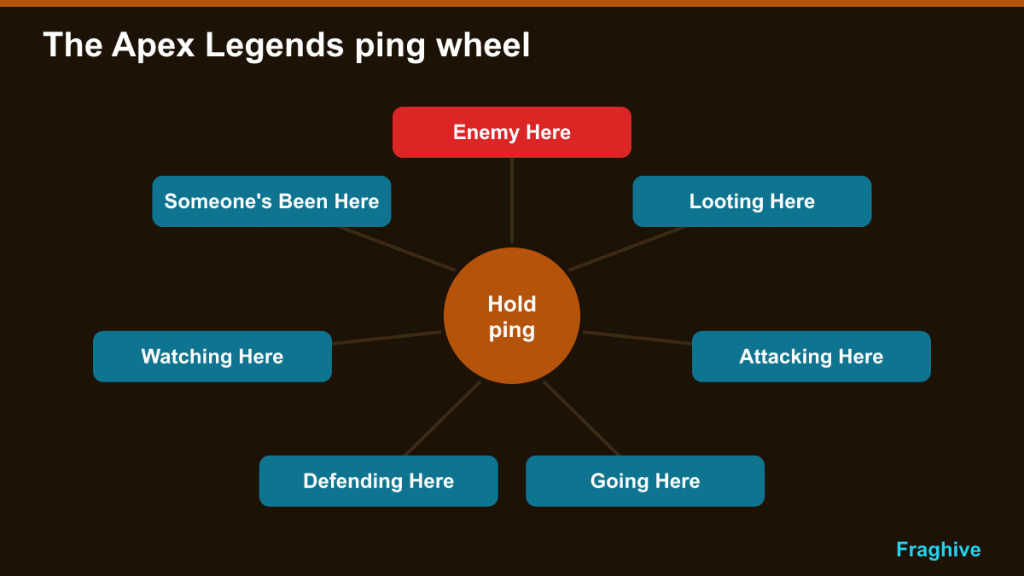
| Ping wheel option | What it tells your team |
|---|---|
| Enemy Here | An enemy is at or near this spot |
| Looting Here | You are searching this area |
| Attacking Here | You intend to push this position |
| Going Here | You are heading to this location |
| Defending Here | You are holding this spot |
| Watching Here | You are covering this angle |
| Someone’s Been Here | Signs of a recent enemy presence |
On PC, Enemy Here also has its own default key, so you can warn the team instantly without opening the wheel. All of these can be rebound in the settings, and it is worth doing so if the defaults feel awkward.
Replies, Dibs and Requests
Pinging is not one-way. Teammates can respond to your pings, which turns markers into a simple conversation. The wiki lists the reply options:
- Ok – acknowledges a ping;
- No or I can’t – declines or signals you are unable to help;
- I’ll join you – for location pings such as Going, Attacking or Defending Here;
- Dibs – claims a pinged weapon or item, so teammates know it is taken.
The system also extends into menus. In your inventory, you can ping a gear slot, attachment slot, weapon, ammo type or healing item to request it from teammates or to tell them you have spare. You can also ping your ultimate ability icon to signal whether it is ready. A teammate who sees “I need light ammo” or “my ultimate is ready” can act on it without anyone speaking.
Why It Was Built: Playing Without Voice Chat
Voice chat has always been the weak point of team games played with strangers. Many players do not use microphones, some cannot, and others prefer not to talk to people they do not know. In a squad-based battle royale, that can leave teams uncoordinated and frustrated.
Respawn designed around that problem. Wikipedia reports that the studio play-tested Apex Legends for a month without using voice chat, with testers using fake names, to simulate how most players would experience the game. The ping system was refined through that testing. Design director Mackey McCandlish described the communication system, three-player squads and a smaller playing area as ways for Apex to carve out a “defensible space” within the genre.
The result is that a well-pinging squad of strangers can coordinate almost as effectively as friends on voice chat. And because it is nonverbal, it also helps players who are deaf or hard of hearing, players with speech difficulties and those who do not share a language with their squad.
Reception and Influence
Critics recognized the system immediately. Wikipedia notes that most reviewers considered it highly innovative. Polygon wrote that it rendered voice chat with strangers largely unnecessary, IGN praised “a superb communication system” and Rock Paper Shotgun called it the gold standard for non-verbal communication in games, while acknowledging that Respawn had refined an idea that was not entirely new. Earlier games, from MOBAs to team shooters, had used map pings and radial communication menus; Apex’s achievement was making the system contextual, fast and complete.
Fortnite moves quickly
The clearest example of its influence came within weeks. Fortnite Season 8, which launched on 28 February 2019, added a ping system bound to the middle mouse button that could mark locations, items and enemies. PCGamesN described it as nearly identical to Apex’s, adapted for Fortnite’s silent characters by using squad colors and icons instead of voice lines. Since then, contextual pinging has become an expected feature in team-based shooters and battle royales.
The patent pledge
Electronic Arts received a US patent for the ping system in 2021. Rather than restrict others, EA announced that the ping patent and four other accessibility-related patents would be free for developers to use from August 2021, which Wikipedia reports EA framed as allowing use “without fear of litigation”. That decision further encouraged its adoption across the industry.
How to Ping Like a Good Teammate
The system is only as useful as the information players put into it. Good pinging habits make a big difference:
Ping enemies first, always
The single most valuable ping is an enemy location. Even a rough marker on a building with an enemy inside tells your team where the danger is. Ping before you shoot when you can; your teammates will turn toward the threat.
Ping useful loot, not everything
Ping attachments, armor upgrades and weapons that your teammates are likely to need. Spamming every item clutters the screen and buries the important information.
Use the wheel for intentions
“Going Here”, “Defending Here” and “Watching Here” tell your team what you are planning. That helps squads avoid splitting up or all watching the same door.
Acknowledge pings
Replying “Ok” or “I’ll join you” lets your teammate know you have seen the message. Silence makes it hard to tell if anyone is paying attention.
Communicate class information
When a Recon Legend scans a survey beacon or a Controller reveals the next ring at a console, the information is only useful if the team acts on it. Pinging enemy positions or the next ring location makes sure everyone does. Our Apex classes guide explains those perks.
Pinging Through a Match
What you ping should change as the match develops.
On the drop
Before landing, the most useful information is where other squads are heading. Pinging enemy squads in the air as they drop tells your team whether your landing spot will be contested, and the jumpmaster can adjust the route before it is too late.
While looting
Early in the match, pings are mostly about gear. Mark armor upgrades, attachments that fit a teammate’s weapon and the ammo type they use. Use the inventory request pings so others know what you are still missing, and mark doors or buildings you have already cleared with “Looting Here” so the squad does not search the same rooms twice.
During a fight
In combat, keep it short. Enemy positions, knocked enemies and your own intentions (“Attacking Here”, “Defending Here”) are what matter. Avoid item pings mid-fight unless a teammate desperately needs healing or ammo.
In the late game
Late circles are about positions and remaining teams. Ping where the next ring is heading, where you plan to hold and every enemy you spot. With few squads left, each enemy ping can decide where your team should look.
Common Pinging Mistakes
- Spam pinging. Repeatedly pinging the same spot, or pinging every item, drowns out important information and annoys teammates.
- Pinging enemies too late. A ping after you are already knocked is much less useful than one before the fight starts.
- Using a generic ping for an enemy. A normal location ping on an enemy’s position may read as “let’s go here”. Use Enemy Here so the squad sees a warning, not an invitation.
- Ignoring requests. If a teammate pings that they need ammo or shields and you have spare, drop them.
- Forgetting the minimap. Pings also appear on the map, so check it during rotations to see what teammates have marked.
Why It Still Matters
Years after launch, the ping system remains one of Apex Legends’ defining features, and its influence is visible across the genre. It changed expectations: players now assume that a team-based shooter will let them communicate clearly without a microphone. For a battle royale built around squads of three, that was not a small quality-of-life feature but a foundation that made the whole design work.