Minecraft Java vs Bedrock Edition: Every Key Difference
Platforms, crossplay, mods versus add-ons, redstone, combat, servers and the new year-based version numbers: how Minecraft Java and Bedrock really differ.
“Minecraft” is not one game but two closely related ones. Java Edition is the direct descendant of the original 2009 PC game. Bedrock Edition grew out of Pocket Edition and now powers Minecraft on consoles, phones, tablets and Windows. Both receive the same content drops, share the same blocks and mobs and look almost identical in screenshots, yet players who switch between them quickly notice differences in combat, redstone, multiplayer and modding.
This guide walks through every difference that matters in practice, with a comparison table near the end. If you are brand new, the choice of edition matters less than learning the basics, which our guide to your first night in Minecraft covers for both editions.
Where the Two Editions Came From
According to Microsoft’s own creator documentation, Java Edition is the current form of the original game released in 2009, simply called “Minecraft” at the time. Bedrock started as Minecraft: Pocket Edition, which had an alpha release in 2011 and stayed in alpha until its full release in 2016. In 2017, with version 1.2.0, Pocket Edition officially became Bedrock Edition, unifying the non-Java versions across platforms. The Minecraft Wiki dates that release, the “Better Together Update”, to September 20, 2017, when the separate editions were renamed simply “Minecraft” and the Xbox One version joined the shared codebase.
The split exists because the two versions are built on different codebases. Java Edition, as the name says, runs on Java, which makes it portable across desktop operating systems and comparatively easy to modify. Bedrock is a separate codebase designed to run on a wide range of hardware, from phones to consoles. Mojang keeps the two in sync for content, but under the hood they are separate programs, and that is the root of every difference below.
Platforms, Price and Buying Both
The most practical difference is where you can play.
- Java Edition runs on Windows, macOS and Linux. It is PC-only. According to the Minecraft Wiki, it requires a 64-bit system; the last version that ran on 32-bit systems was 1.20.4.
- Bedrock Edition runs on Windows, Xbox One and Xbox Series X|S, PlayStation 4 and 5, Nintendo Switch, Android, iOS and iPadOS, ChromeOS and Fire OS. As of October 2026, the Minecraft Wiki lists the Nintendo Switch 2 version as upcoming with an October 27, 2026 release date.
On PC, you no longer have to choose. Since June 7, 2022, the Windows versions have been sold together as “Minecraft: Java & Bedrock Edition for PC”, and players who bought Java Edition before that date also received Bedrock for free. Both are launched through the Minecraft Launcher, and both need a Microsoft account. If you play on a console or phone, Bedrock is your only option.
Controls follow the platforms. Microsoft’s documentation notes that both editions support mouse and keyboard, but only Bedrock has official controller support, and on phones and tablets Bedrock players use touch controls.
Crossplay and Multiplayer
This is often the deciding factor. Bedrock has crossplay across all its platforms: a player on a Switch, a player on a phone and a player on a Windows PC can share the same world, Realm or server. Java and Bedrock cannot play together in the standard game; you need the same edition as your friends.
The ways to play together also differ:
- Realms. Mojang’s subscription-hosted worlds exist for both editions, but Java Realms and Bedrock Realms are separate subscriptions and cannot be mixed.
- Servers. Java has an enormous ecosystem of community servers that anyone can join by IP address. Bedrock also supports external servers, but according to the Minecraft Wiki, joining servers by IP is not supported on Xbox, Nintendo Switch or PlayStation. Console players instead see a list of Featured Servers, partnered servers that offer minigames.
- Online subscriptions. Some Bedrock online features on consoles require that console’s paid online subscription.
If your friend group includes anyone on console or mobile, Bedrock is the natural choice. If everyone plays on PC and you want access to the biggest community servers, Java has the edge.
Mods, Add-Ons and the Marketplace
Customization is where the two editions differ most in philosophy.
Java Edition: open modding
Java’s code is relatively easy to modify, and the Minecraft Wiki notes that Java’s protocol is well documented as a result. That has produced the most robust modding and custom server scene in gaming: mod loaders, total-conversion modpacks, performance mods, shaders and server plugins that create entire minigames. Java also supports data packs and resource packs officially. Mods are free and community-made, but they are installed by hand or through third-party launchers, and heavy modpacks raise hardware requirements.
Bedrock Edition: add-ons and the Marketplace
Bedrock uses an official add-on system. Microsoft’s documentation explains that Bedrock’s behavior packs are the equivalent of Java’s data packs, alongside resource packs, though the formats differ significantly. Content can be distributed through the Minecraft Marketplace, an in-game store selling add-ons, skin packs, texture packs and worlds from official and partner creators, paid for with Minecoins on most platforms.
The trade-off: Java offers deeper and free modification; Bedrock offers curated, easy-to-install content that works across devices, some of it paid. Each also has unique creative tools. Microsoft notes that Java can create custom fonts and GLSL shaders, while Bedrock cannot, and Bedrock can create custom particles and fog, which Java cannot.
Redstone Differences
Redstone, Minecraft’s in-game circuitry, behaves slightly differently in each edition. Most simple builds such as doors, lamps and basic farms work on both. Complex contraptions are where things break. If redstone is new to you, learn the fundamentals first; the differences only matter once you start building advanced machines or copying tutorials.
- Quasi-connectivity exists only on Java. On Java, pistons, dispensers and droppers can be activated by anything that would power the space above them, even if nothing is there. Mojang has marked it “Works As Intended”. Builds that rely on it, including Block Update Detector (BUD) switches, will not work the same way on Bedrock.
- Pistons. Microsoft’s documentation notes that on Bedrock, pistons need one tick to retract and will not leave blocks behind when given a one-tick pulse, which is a common Java trick.
- Update order. The order in which redstone components update is slightly different, so timing-sensitive machines can behave differently.
The practical rule: when following a redstone tutorial, check which edition it was built for. A flying machine or tree farm designed for Java can fail on Bedrock, and vice versa.
Combat Differences
Combat is the difference players feel fastest when switching editions.
Java Edition introduced an attack cooldown in version 1.9. After each swing, your weapon needs a moment to recharge, and attacking before it is ready deals reduced damage. Fighting on Java is about timing your hits. Sweep attacks, the sword swing that hits several nearby enemies, are also Java-only, and Java’s critical hits require the cooldown to be mostly recharged.
The Minecraft Wiki describes the cooldown as a Java-exclusive mechanic. On Bedrock, combat plays closer to the older style, where speed of clicking matters more. There are smaller differences too: for example, the wiki notes that on Bedrock, critical hits can combine with sprint-knockback attacks, and that only Java lets players knock back non-living entities.
For casual survival this rarely matters, but PvP communities are strongly tied to one edition’s feel, and switching editions can make experienced fighters feel clumsy for a while.
Technical and Gameplay Differences
A long list of smaller differences rarely matters for beginners but becomes noticeable over time:
- World format. Bedrock stores worlds in the LevelDB format, Java in the Anvil format, so world-editing tools usually work with only one edition. Converting worlds between editions requires third-party tools and is rarely perfect.
- Commands. Microsoft notes that Bedrock’s command structure resembles Java’s from before version 1.13, and that blocks are often named differently between editions.
- Performance. Bedrock is generally designed to run on modest hardware. Java is easy to tune with performance mods but can be heavier out of the box.
- Updates. Java updates through the Minecraft Launcher. Bedrock updates through each platform’s store or system, so console players may receive patches according to platform certification.
- Feature parity. Mojang has worked for years to bring the editions closer, so many old differences have disappeared. Expect small mechanical differences in mob behavior, farms and world generation to remain, and check an edition-specific source before building a complex farm.
Year-Based Version Numbers
For years both editions used numbers like 1.20 and 1.21, with Bedrock adding extra digits such as 1.21.120. In December 2025, Mojang announced a switch to year-based version numbers for both editions, reflecting its move to several smaller “game drops” per year instead of one big annual update.
The new format is year.drop.hotfix. According to the Minecraft Wiki:
- Bedrock Edition 26.0, released on February 10, 2026, was the first Bedrock release to use the year-based format.
- Java Edition 26.1, the “Tiny Takeover” drop, released on March 24, 2026, was the first Java release using it.
- As of mid-October 2026, the wiki lists Java Edition 26.3 (released September 15, 2026) as the latest Java release, and Bedrock version 26.52 as its latest Bedrock release.
The editions share the “26” year prefix, but the numbers after it do not always line up exactly, because Bedrock pushes more frequent incremental releases. Do not assume that “26.3” on Java and a similarly numbered Bedrock version contain exactly the same fixes; compare the drop names instead. For players, the main takeaway is simple: the first number now tells you the year.
Comparison Table
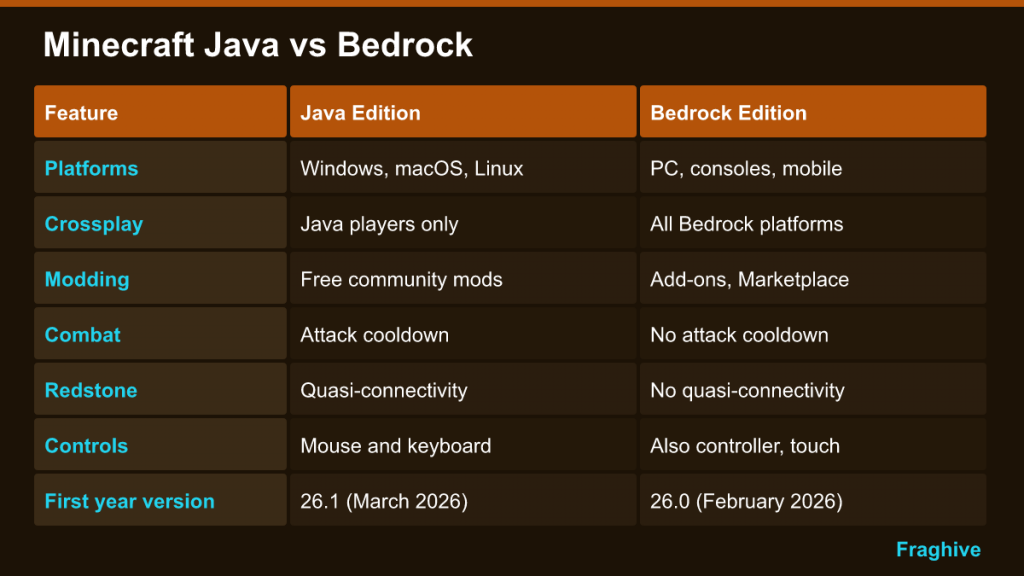
| Feature | Java Edition | Bedrock Edition |
|---|---|---|
| Platforms | Windows, macOS, Linux | Windows, Xbox, PlayStation, Switch, Android, iOS/iPadOS, ChromeOS, Fire OS |
| Crossplay | Java players only | Across all Bedrock platforms |
| Modding | Free community mods, data packs, resource packs, shaders | Official add-ons and behavior packs; Marketplace content |
| Servers | Huge community scene, join by IP | External servers (not by IP on consoles); Featured Servers |
| Realms | Java Realms subscription | Separate Bedrock Realms subscription |
| Combat | Attack cooldown and sweep attacks | No attack cooldown |
| Redstone | Quasi-connectivity, one-tick piston tricks | No quasi-connectivity; different piston timing |
| Controllers | Mouse and keyboard | Mouse and keyboard, controller, touch |
| First year-based version | 26.1 (March 2026) | 26.0 (February 2026) |
Which Edition Should You Choose?
Choose Java if you play only on a PC, you want mods, shaders or modpacks, you are interested in technical redstone, or you want to join big community servers by IP.
Choose Bedrock if you play on console, phone or tablet, your friends are on different devices, you want controller support on PC, or you prefer curated add-ons and Marketplace worlds over manual modding.
On Windows, the question mostly answers itself: you get both in one purchase, so try each and keep whichever fits. Many players use Bedrock for crossplay with friends and Java for modded solo worlds.
For a broader look at how Minecraft’s open-ended survival compares with tougher games in the same genre, see our survival crafting genre explainer.